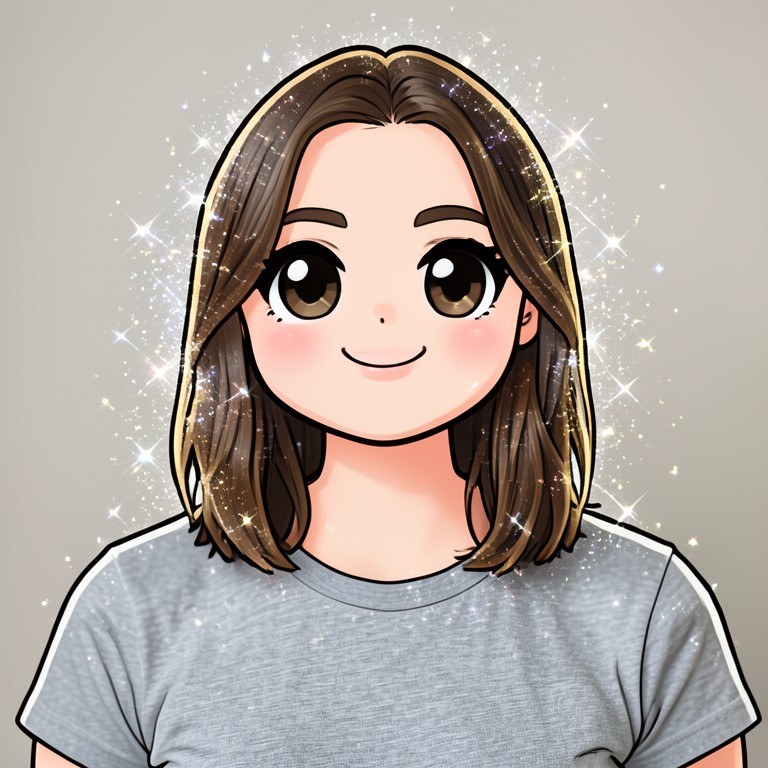

Upload a photo, and the chibi filter redraws you as a super-deformed anime character: oversized head, tiny body, huge sparkly eyes. It keeps your hairstyle, outfit, and expression, so the result is unmistakably you — in maximum-cuteness chibi form. Free and no sign-up.
What the Chibi Filter Does to Your Photo
Chibi (also called super-deformed or SD style) is the art style behind countless anime mascots, stickers, and collectible figures: heads drawn at one-third to one-half of total body height, simplified tiny features, and enormous eyes that carry all the emotion. This chibi filter analyzes your uploaded photo — hair, eye color, skin tone, clothing, accessories, and pose — then redraws the whole subject in clean cel-shaded chibi style with bold outlines. Because the AI transfers your real features into the cartoon instead of pasting your face onto a template, every chibi is unique to the photo you upload.
Popular Ways People Use Chibi Cartoons
Chibi versions of yourself make perfect profile pictures for Discord, TikTok, and gaming accounts because the exaggerated features stay readable even at tiny avatar sizes. Couples and friend groups turn shared photos into matching chibi sets. Streamers use chibi self-portraits as emotes and channel art, artists use them as references for sticker sheets, and pet owners — yes, it works on pets too — turn cats and dogs into chibi mascots. Ask for a plain background if you plan to cut the chibi out as a sticker.
Getting the Cutest Possible Chibi
Start with a clear, front-facing photo where the face is well lit and not obscured. Photos where your outfit is visible give the AI more to work with, since clothing color is a big part of chibi character identity. After the first result, refine with follow-up requests: add sparkles, change the background to pastel pink, put the character in a magical-girl outfit, or ask for a white sticker outline. Each edit builds on the last, so you can iterate until the chibi is exactly right.